vim Most Commonly Used: Frequency from High to Low
A level
-
i: insert mode
-
:wq: save and exit
-
yy: copy entire line
-
dd: delete current line and add to clipboard
-
p: paste from clipboard
-
o: insert line after current line
-
0: move cursor to beginning of line
-
$: move cursor to end of line
-
gg: move cursor to first line
-
G: move cursor to last line
-
u: undo
-
C-r: redo
-
Search for str1 and replace with str2: %s/str1/str2/g (this is quite useful)
B level
-
gg: move cursor to top of page
-
:e: open a file
-
:saveas: save as
-
:q!: quit without saving
-
Multi-line copy
1
2
3
4
Press v to enter visual mode; press y to copy; press p to paste

Copy lines 9 to 15 to line 16
:9,15 copy 16
vimium (Browser Tool)
gg: go to top of page G: go to bottom of page d: scroll down one page u: scroll up one page f: open link in current page F: open link in new page
Multi-window Management Tool Screen
Most Commonly Used Commands
- Create new window session
1
screen or screen -S yourname
- Reconnect to session
1
screen -r <screen_pid>
Note: If you cannot enter session after unexpected disconnection, you need:
1
screen -D -r <screen_pid>
View all screen sessions
1
screen -ls
- Temporarily disconnect session
1
control+A d
- Stop current window
1
control+A k
- Clear dead sessions:
1
screen -wipe
virtualenv Environment Management
- Installation
1
pip install virtualenv
Create virtual environment for project
1
2
3
4
$ cd project_dir
$ virtualenv venv_name
Choose python interpreter for environment:
$ virtualenv -p /usr/bin/python2.7 venv_name
Use virtual environment:
1
$ source venv_name/bin/activate
- Deactivate virtual environment
1
$ . venv_name/bin/deactivate
anaconda
- Download anaconda
1
$ wget anaconda_latest_version_url
- Install anaconda
1
$ bash anaconda_latest_version
- Configure environment variables
1
2
echo 'export PATH="~/your_anaconda_version/bin:$PATH"' >> ~/.bashrc
source ~/.bashrc
- Conda environment management
1
2
3
4
5
6
7
8
9
10
11
# Create environment
conda create --name your_env_name python=your_python_version
# Activate environment
source activate your_env_name
# Deactivate environment
deactivate your_env_name
# Delete environment
conda remove -name your_env_name --all
# View installed environments
conda info -e
JupyterNotebook
Famous software. I usually use Pycharm as my IDE. However, recently while studying Yjango’s code, I discovered that JupyterNotebook has unique advantages in demonstration and teaching (cell functionality).
Command Mode Common Instructions
-
jupyter notebook: Open jupyternotebook from console -
Enter: enter edit mode -
Shift-Enter: run cell, automatically jump to next cell -
Ctrl-Enter: run cell -
y: cell enters code mode -
m: cell enters markdown mode -
a: insert cell above -
b: insert cell below -
z: restore last deleted cell -
dd: delete selected cell -
s: save file
matplotlib Integration
Adding the following code at the top of the file allows images to be displayed in the code. This operation saves the trouble of closing a bunch of images at once.
1
%matplotlib inline
Commitizen
This small tool is specifically designed to reduce the feeling of being at a loss for words when doing commit -m and the feeling of helplessness during code review.
1. Installation (mac environment)
-
brew install nodeInstall nodeJS -
cnpm install -g commitizenUse cnpm to globally install commitizen -
cnpm install -g
2. Usage
-
cnpm install -g cz-conventional-changelogLoad Angular specification template file -
echo '{ "path": "cz-conventional-changelog" }' > ~/.czrcUse Angular specification template file -
git czis equivalent togit commit -m
3. Advanced Usage
-
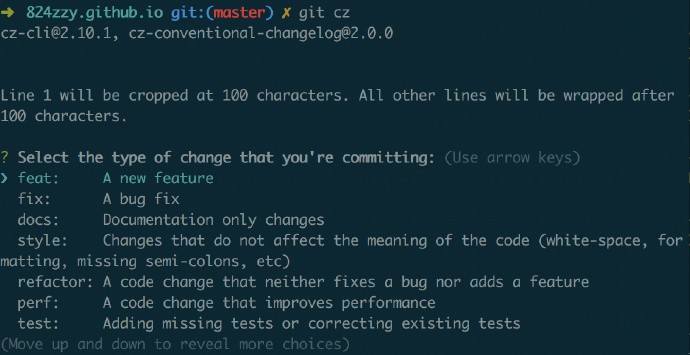
First step fill in
type -
feat: new feature
-
fix: fix bug
-
doc: documentation change
-
style: code format change
-
refactor: refactoring of an existing feature
-
perf: performance optimization
-
test: add tests
-
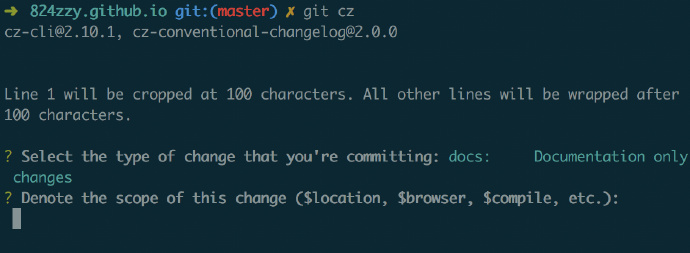
Second step fill in
scope: This is the scope, recommended options are as follows -
$all: indicates large impact area, such as modifying the project framework will affect the entire program. Or global files
-
$loation: indicates small impact, some small features
-
$module: indicates will affect certain modules such as login module, homepage module, user management module, etc.
-
Custom is also an option, but must start with
$
-
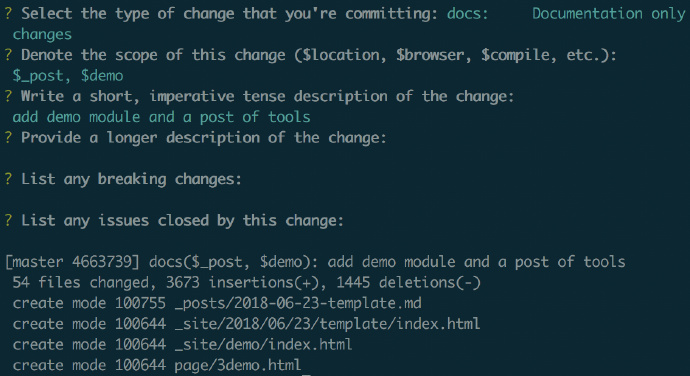
Third step fill in other information:
-
subject: briefly describe this change -
body: specific modification information should be as detailed as possible -
footer: place notes, if it’s a bug, you can put the bug id
4. Final Stage Usage
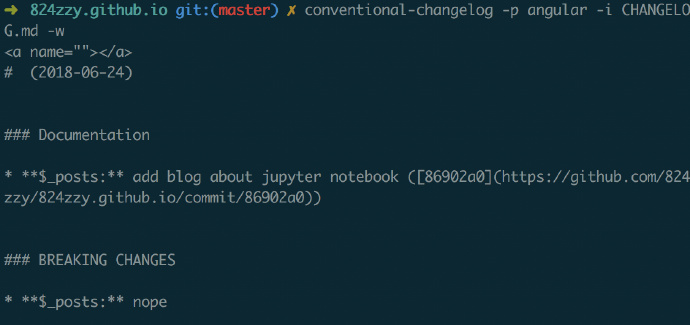
Generate Change log:
-
cnpm install -g conventional-changelog-cliFirst install client -
conventional-changelog -p angular -i CHANGELOG.md -s -r 0Directly generate log file
Linux Database Common Commands
mysql
- Start mysql service
1
2
3
4
5
mysql.server start- Open mysql
mysql -u root -p
References and citations