hexo Basic Usage
Create New Page
1
hexo new page your_page_name
After executing the command, /source/your_page_name/index.md will be generated.
Then find the menu property in theme/next/_condig.yml to set up the routing.
If necessary, find menu in theme/next/languages to set it up.
Create New Blog Post
1
2
3
4
# Create new article
hexo new post your_post_name
# Create new draft
hexo new draft your_draft_name
Basic Configuration of Blog Theme
Blog basic information modification location: /_config.yml
Blog logo modification location:
1
/themes/next/source/images/apple-touch-icon-next.png;/themes/next/source/images/favicon-16*16-next.png;/themes/next/source/images/favicon-32*32-next.png;
Three files need to be modified. For resizing images, it’s recommended to use Gaitubao from Baidu search.
Blog background image modification location:
/theme/next/source/css/_custom/custom.styl
Implement fork me on github in the upper right corner:
Copy code from here to the themes/next/layout/_layout.swig file below the line <div class="headband"></div> and modify href.
Click animation effects:
Modification location is themes/next/source/js/src/click-effect.js. Animation effects can be customized. The default setting is core socialist values.
Change the tag with # at the bottom of the article to a prettier style:
Modify template /themes/next/layout/_macro/post.swig, search for rel="tag">#, replace # with <i class="fa fa-tag"></i>
Modify author avatar:
/themes/next/source/images/avater.jpg
Language setting bug:
1
2
1. In the hexo folder's theme next folder's language folder, find zh-Hans.yml and rename to zh-CN.yml
2. In hexo folder's _config.yml modify language: zh-CN
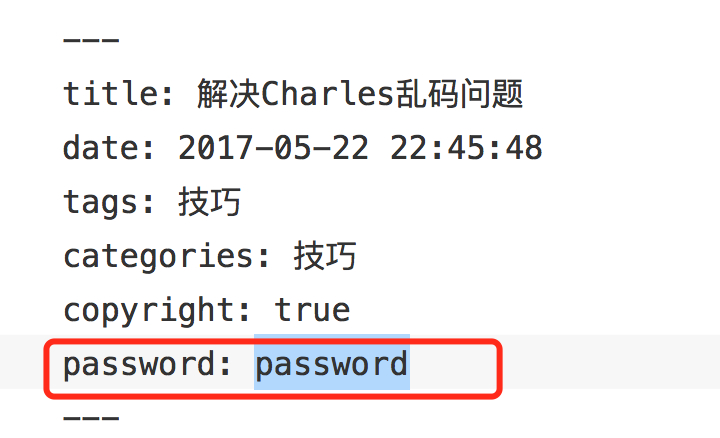
Article password protection:
Open themes->next->layout->_partials->head.swig file, add the following code on the line after rel="stylesheet":
1
2
3
4
5
6
7
8
9
10
11
12
13
14
<script>
    (function () {
        if ('{{ page.password }}') {
            if (prompt('Please enter article password') !== '{{ page.password }}') {
                alert('Wrong password!');
                if (history.length === 1) {
                    location.replace("http://xxxxxxx.xxx"); // Replace this with your homepage
                } else {
                    history.back();
                }
            }
        }
    })();
</script>
Usage is as follows:
Friendly links setting: Set links in /themes/next/_config.yml in Blog rolls
1
2
3
4
5
6
7
8
# Blog rolls
links_icon: link
links_title:
- [https://www.jianshu.com/p/f5c184047e72](https://www.jianshu.com/p/f5c184047e72)

- [https://github.com/xiaweizi/BackupBlog/commit/b97173da33837604a31f2e5f78b17ba819306f74](https://github.com/xiaweizi/BackupBlog/commit/b97173da33837604a31f2e5f78b17ba819306f74)

- [https://blog.csdn.net/luzheqi/article/details/52798557](https://blog.csdn.net/luzheqi/article/details/52798557)

- [https://blog.csdn.net/qwerty200696/article/details/79010629](https://blog.csdn.net/qwerty200696/article/details/79010629)

- [https://blog.csdn.net/pop1586082213/article/details/54576131](https://blog.csdn.net/pop1586082213/article/details/54576131)

- [https://github.com/nodejs/node-v0.x-archive/issues/3911](https://github.com/nodejs/node-v0.x-archive/issues/3911)